
 ~3m9:50
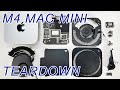
2024 M4 Mac Mini Teardown FULL - SSD Removable
Nov 8, 2024
Read: ~3m · You save: 7 min
2024 M4 Mac Mini Teardown: Inside the Smallest Mac with SSD Removal
Tear down the smallest Mac yet: the 2024 Mac Mini with M4 chip. See inside the compact design, SSD, logic board, and the M4 chip reveal.
Published 2024-11-08
This teardown examines the 2024 Mac mini with the M4 chip. The reviewer tested the base configuration, with 16 GB of memory and a 256 GB solid-state drive (SSD). The procedure documented the removal of the rear cover, the fan, the speaker, the SSD, the logic board, and the heat sink.
Product Overview
The computer measures approximately 5 by 5 inches, with a height of 2 inches. It ships in a compact box.
Configuration options:
| Component | M4 | M4 Pro |
|---|---|---|
| Memory (RAM) | Up to 32 GB | Up to 64 GB |
| SSD storage | Up to 2 TB | Up to 8 TB |
Ports and Connectivity
Front:
- Two USB-C ports
- Power indicator
- 3.5 mm audio jack
Rear:
- Power port
- Ethernet port
- HDMI port
- Three Thunderbolt 4 ports (Thunderbolt 5 on the M4 Pro)
- Power button
Cooling: The fan draws air in through the front half of the grille and exhausts it through the rear half.
Disassembly Procedure
1. Remove the Rear Cover
- Disconnect the power cable.
- Insert a small screwdriver into the grille and lift the cover edge. The reviewer advised against using a pry bar. The silicone ring at the edge holds no screws, so the cover releases when lifted at the edge.
- Remove the perimeter screws, which are T5 Torx.
- Remove the four central screws securing the heat sink, which are T3 Torx.
- Lift off the rear cover. Cables remain attached and require care during removal.
The metal grille functions as an antenna. The reviewer set it aside before continuing.
2. Remove the Fan
- Remove the four T5 Torx screws at the base of the fan. The reviewer identified one T5 screw at the bottom, one further screw in a second location, one in a third location, and two additional T5 screws at the bottom of the fan.
- Disconnect the fan cable. Black tape covers the connector. Flip the connector upward to release it. Pulling without this step can tear the fan from the logic board.
3. Remove the Speaker
- Remove the T3 Torx screws holding the speaker.
- Disconnect the wire at the rear.
4. Disconnect the Battery and Antenna Cable
- Disconnect the cable that connects the button battery and the rear antennas. The cable locks in place with T3 Torx screws.
5. Remove the Large Standoffs and SSD
- Remove the large standoff screws, which are T9 Torx.
- Remove the SSD using a T9 Torx driver.
- Remove the remaining large T9 screws: one at the bottom and two on top. The top screws are silver.
6. Remove the Heat Sink
- Remove the two T5 Torx screws securing the heat sink.
7. Release the Logic Board
The logic board did not release after the previous steps. The reviewer took the following actions:
- Remove the several T3 Torx screws on the front of the chassis.
- Disconnect the front I/O connectors: the power indicator, the 3.5 mm audio jack, and the two front USB-C ports.
- Remove the two screws on the left side.
- Press the components toward the front to relieve pressure. The logic board then released.
8. Separate the Power Supply
The logic board is split, with the power supply on one side.
- Disconnect the connector on the power supply side of the logic board.
- Disconnect the power supply from the other side of the logic board.
Internal Components
Power supply: The reviewer noted that the power supply is nearly as large as the computer itself. The reviewer stated that an external power supply could allow a considerably smaller Mac mini. This statement is the reviewer's assessment and was not tested.
Logic board:
- The SSD sat in a dedicated location on the board.
- Chip covers protect the components. The top-right cover required slight force to remove. The two other chip covers are held by adhesive.
- An aluminum plate on the back of the logic board is held by adhesive.
Heat sink: Removing the heat sink requires several T5 Torx screws. Removing it exposes the M4 chip.
Reviewer Observations
The reviewer described the teardown as difficult. The device uses Torx screws ranging from T3 to T9 and several small components. The reviewer compared the process to disassembling an iPhone.
Introduction and Configuration
The presenter introduces the 2024 Mac Mini with M4 chip and its compact size, shows the base configuration, and lists configuration options.
- Mac Mini measures about 5 x 5 inches and 2 inches in height
- Base model has 16 GB of memory and 256 GB of SSD storage
- RAM is configurable up to 32 GB on the M4 and 64 GB on the M4 Pro
- SSD is configurable up to 2 TB on the M4 and 8 TB on the M4 Pro
Ports and Airflow
A walkthrough of the Mac Mini's external ports and airflow design.
- Front has two USB-C ports, a power indicator, and a 3.5 mm audio jack
- Back has power port, Ethernet, HDMI, and three Thunderbolt 4 ports (Thunderbolt 5 on the M4 Pro)
- Power button and fan are on the back
- Fan intakes air through the front half of the grill and exhausts through the rear half
Opening the Case and Removing the Fan and Speaker
The presenter opens the case by peeling the back housing, then removes the back cover, fan, and speaker.
- Silicone ring does not hold screws; the back housing is peeled up using a small screwdriver inserted into the grill instead of a pry bar
- Perimeter has T5 torx screws; the center has four T3 heat sink screws
- Metal grill serves as an antenna and is set aside
- Fan must be disconnected by flipping up the connector behind black tape to avoid ripping it off the logic board
- Speaker is held by T3 torx screws and a wire must be disconnected
Removing the SSD, Standoffs, and Logic Board
Removal of the SSD, antennas cable, large standoffs, and heat sink, followed by freeing the logic board.
- Battery cable and antenna cable are locked with T3 torx screws
- Large standoff screws are T9 torx; the SSD is removed with a T9 torx driver
- Two more T5 screws secure the heat sink
- Front USB-C connectors, audio jack, and power indicator connectors are removed after releasing T3 screws
- Logic board is freed with some pressure on components pushed toward the front
Logic Board Inspection and M4 Chip Reveal
Inspection of the power supply and logic board, including removal of chip covers and the heat sink to reveal the M4 chip.
- Power supply is nearly as large as the computer itself; the presenter suggests an external supply could allow a smaller Mac Mini
- Logic board is split with the power supply on one side and connects on the other side
- Chip covers pop off with force; some are held by adhesive, and an aluminum plate is also adhered
- Heat sink is secured by T5 torx screws and removed to reveal the M4 chip