
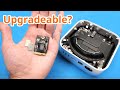
UPGRADING a Brand NEW M4 Mac mini
Unboxing a brand-new M4 Mac mini, tearing it down, and swapping its soldered NAND chips to upgrade storage. Benchmarks, reballing, and a DFU restore.
Published November 9, 2024
This article documents the internal storage upgrade of a base-model M4 Mac mini, unboxed the day after the model's release. The goal was to increase internal storage from 256 GB to 2 TB. The author reports that the upgrade reached 1 TB. Memory on Apple silicon systems cannot be upgraded, according to the author's findings.
Specifications and Ports
The test unit was the base model, with the following configuration:
| Component | Specification |
|---|---|
| Processor | Apple M4, 6 performance cores and 4 efficiency cores |
| Unified memory | 16 GB on-package LPDDR5 |
| Internal storage | 256 GB, removable NAND modules |
| Ethernet | Gigabit (10 Gb Ethernet option not selected) |
| Dimensions | 5 × 5 inches |
The rear panel includes an Ethernet port, an HDMI port, and three USB-C ports that support Thunderbolt 4. The front panel includes two USB-C ports that do not support Thunderbolt, a power LED, and a headphone jack. The power button is on the underside. The power supply is internal.
Baseline Benchmarks
Benchmarks were run before disassembly.
- Geekbench 6 (CPU): Single-core score of 3855 and multi-core score of 15,515. The reported clock speed is 4.41 GHz.
- AJA System Test (storage, 4 GB file size): Approximately 1,700 MB/s for both read and write.
Teardown
Exterior and Chassis
- Bottom panel: The plastic cover is held by four push pins and adhesive. It was removed with a spudger.
- Bottom cover: Four T5 screws along the sides secure the cover. Four additional T5 screws hold the metal shield over the ribbon cable.
- Fan: The fan is secured by smaller screws, identified as T3 or T4.
- Storage modules: Storage is on removable NAND modules, similar to those in the Mac Studio. One NAND chip sits on the rear of the board and one on the front. The Mac Studio module contains four NAND chips. A T8 screw secures the module.
- Connector panel: Four screws secure the panel. Disconnecting it provided access to the Wi-Fi board.
Wireless and Power Components
- The Wi-Fi chip is on a small board that connects to the system through a single connector.
- Three Wi-Fi antennas are integrated into the metal panel.
- The SMC clock battery is located near the Wi-Fi board.
Logic Board and System-on-Chip
- The front ports were removed. The logic board can be rotated out of the chassis after the ports are pushed back.
- The power supply is at the top of the chassis.
- The logic board is small.
- Copper foil insulating tape covers the rear of the board. Removing the black plastic insulator damaged the tape. The author states that the tape may not be reusable.
- The heat sink is secured by mounts, which were removed.
The M4 system-on-chip is similar in design to the M1 chip. Its footprint is considerably larger. Its width is about the same as the M1, but it is taller. The RAM chips are also taller than those on the M1. The heat spreader is flat, while the M1 spreader has a beveled edge.
The author replaced the thermal paste on the processor. The thermal paste on the RAM chips was not replaced, because it is a thicker compound that liquid thermal paste cannot substitute.
Storage Module Preparation
Two blank 1 TB NAND chips, model K6B2, were used for the upgrade. The author believes these chips are compatible with the M4 Mac mini. The same model has been used in the M3 MacBook Air and the iPhone 14, 15, and 16.
The NAND chips installed in the module must be blank. The author's earlier video on the Mac Studio upgrade describes the same process in more detail.
Removing the Original NAND Chips
The original chips are secured with underfill, an adhesive compound. The removal process was as follows:
- Apply low heat to soften the underfill around the edges of the chip, especially along the top edge. Scrape the underfill away. This prevents components from lifting during chip removal.
- Set the hot air station to 280–300 °C.
- Lower the temperature to 270 °C when the chip begins to lift. Remove the chip.
- Scrape residual underfill from the pads with a removal tool.
- Apply flux and remove residual solder with a soldering iron.
- Remove remaining solder with solder wick.
- Clean the pads with rubbing alcohol and a paper towel.
The same process was repeated for the chip on the opposite side of the board.
Reballing the New NAND Chips
The new chips were reballed one at a time, because the stencil had warped in previous use. The process was as follows:
- Secure the chip to the stencil in the correct position with capped tape. Align the chip with the stencil holes.
- Apply solder paste, which consists of small solder balls suspended in flux, into the stencil holes. Press the paste in several times to ensure even deposits.
- Set the hot air station to 280–300 °C. Heat the paste until it melts onto the pads. Hold the stencil flat against the chip with tweezers.
- Remove the chip from the stencil.
- Apply additional flux. Heat the chip to seat the balls fully into the pads.
The second chip was reballed with the same process.
Soldering the Chips to the Module
- Heat the board to bring it to a suitable temperature.
- Apply a small amount of flux to the pads.
- Align the chip with the pads. Pin 1 faces the connector on both sides of the board.
- Heat the chip with the hot air station to solder it to the board.
- Allow the board to cool. Flip the board and solder the second chip to the opposite side.
Restore and Verification
The author did not replace the shield under the ribbon cable before testing. The power button was reconnected to power the device for testing.
Restore Attempts
- The Mac mini was connected to an M1 MacBook Air through a USB-C port. The author selected the port furthest from the HDMI port. The device was placed into DFU mode by holding the power button while connecting power. The front LED flashed amber, confirming DFU mode.
- Holding the Option key while selecting Restore Mac in Finder, the author selected the IPSW file for the M4 Mac mini. The restore did not proceed. The author attributes the failure to the MacBook Air running macOS Sonoma. The restore of this newer model requires macOS Sequoia.
- An M1 Mac mini running macOS Sequoia was used for the restore. The restore began. The DFU port that worked was the center port. The author states that all three rear USB-C ports enter DFU mode, but only the center port worked in this test.
Restore with 1 TB NAND Chips
The first restore attempt with the two 1 TB NAND chips did not succeed after repeated attempts. The author believes one or both chips were defective. No spare 1 TB chips were available.
The process was repeated with two 512 GB NAND chips. The resulting configuration is 1 TB. The restore completed successfully. The display showed no video during early stages of the restore, which the author states may be normal for the M4 Mac mini. The display later produced video. The system booted after the restore.
Post-Upgrade Verification
- About This Mac: Confirmed the same machine with the upgraded storage.
- System Profiler: Detected an Apple SSD AP1024Z, confirming 1 TB of internal storage.
The upgrade produced 1 TB, not the 2 TB target.
Post-Upgrade Benchmarks
- Geekbench 6 (CPU): The multi-core score was 14,633. The author recalls the original multi-core score as approximately 15,000. The original result was not saved. The author attributes the difference to variance in the test.
- AJA System Test (4 GB file, continuous mode): The author reports approximately 3 Gb/s for write and 2 Gb/s for read. The read and write speeds were both about 1,700 MB/s before the upgrade. The author describes the result as slightly better than expected and sufficient for general use.
Cost and Component Sourcing
- The two 1 TB NAND chips cost approximately $160 for the pair.
- The two 512 GB NAND chips used for the successful upgrade cost approximately $90 for the pair.
- The author ordered four NAND chips. The supplier shipped three. The author did not have the fourth chip required to complete the 2 TB configuration.
Summary
The upgrade produced a 1 TB internal storage configuration on the M4 Mac mini, from the base 256 GB model. The 2 TB target was not reached. The author attributes the failure to the first set of 1 TB NAND chips and to the missing fourth chip in the order. The total upgrade was completed within a few hours of receiving the unit.
Unboxing and Port Overview
The Mac mini is unboxed and its ports and design are examined, with a plan to benchmark, tear down, and upgrade storage.
- Brand-new base M4 Mac mini with 16 GB unified memory and 256 GB storage, received about a day after release
- Internal power supply; gigabit Ethernet only (10 Gb Ethernet option not selected)
- HDMI port and three USB-C ports supporting Thunderbolt 4 on the back
- Two USB-C ports on the front that do not support Thunderbolt; power LED and headphone jack on front
- Machine measures about 5x5 inches, similar in look to an Apple TV but slightly taller and bigger
- Power button on the bottom, controversial due to the raised base
Setup and Baseline Benchmarks
Baseline performance and disk speed are measured before teardown using Geekbench 6 and AJA System Test.
- Geekbench 6 CPU benchmark run; single-core score 3855, multi-core score 15515
- Six performance cores and four efficiency cores; clock speed 4.41 GHz
- AJA System Test set to 4 GB test file; about 1700 MB/s read and write speeds
- System report shows 16 GB on-package LPDDR5 and 256 GB NVMe storage (Apple ap0)
Teardown and Logic Board Removal
The bottom panel, fan, Wi-Fi board, and logic board are removed, exposing the M4 SoC and removable NAND modules.
- Bottom plastic panel secured by four push pins and adhesive, removed with a spudger
- Four T5 screws along the sides; smaller screws likely T3 or T4 for the fan
- Storage uses removable NAND modules similar to the Mac Studio, with one NAND chip on each side of the board
- NAND module removed with a T8 screw
- Wi-Fi chip on a small board with three antennas integrated into a metal panel
- SMC battery located near the Wi-Fi board
- Power supply sits at the top of the machine; logic board is very small
- Insulating copper foil tape on the back of the board was damaged during removal
- Heat sink mounts removed; thermal paste replaced on the SoC (not on RAM chips)
- M4 SoC resembles the M1 SoC but is larger, with a flat heat spreader without the M1's beveled edge
NAND Replacement and Reballing
Original NAND chips are removed from the module using hot air and cleaned, then new 1 TB NAND chips are reballed and soldered on.
- Replacement chips are blank 1 TB NAND, model K6B2, said to work in iPhone 14/15/16 and M3 MacBook Air
- Original NAND is underfilled; underfill removed with low heat and a scraper
- Hot air set to about 280 to 300 °C to remove chips; lowered to 270 °C near removal
- Pads cleaned with soldering iron, flux, solder wick, and rubbing alcohol
- Reballing done one chip at a time with a stencil, solder paste, and an optical drive as platform
- Chips soldered to the board with hot air and flux, pin one toward the connector
- Creator refers viewers to the earlier Mac Studio upgrade video for the same process
Restore and Initial Test
The board is reassembled and restored via DFU mode from an M1 MacBook Air, but restore fails with 1 TB NAND chips and succeeds with 512 GB chips.
- Mac mini connected to M1 MacBook Air via USB-C for DFU restore
- DFU mode worked on the port furthest from HDMI; later the center port was found to work
- Restore failed on Sonoma; succeeded when restoring from a Mac mini M1 running Sequoia
- Restore with 1 TB NAND chips failed, possibly due to bad chips
- Repeated process using a 512 GB NAND pair, giving an expected 1 TB configuration
- Machine booted and shows an Apple SSD ap1 1 TB in system profiler
Final Benchmarks and Cost
Post-upgrade benchmarks show nearly unchanged CPU performance and a modest disk speed change; a 2 TB upgrade was not achieved.
- Geekbench 6 multi-core score about 14633, slightly lower than the earlier ~15000 result
- AJA System Test after upgrade: about 3 GB/s write and 2 GB/s read, slightly better than before
- Only three NAND chips arrived from an order of four, preventing the 2 TB upgrade
- Cost: about 90 for the 512 GB set
- Upgrade completed within a few hours of receiving the machine